



Escenario de ejemplo:
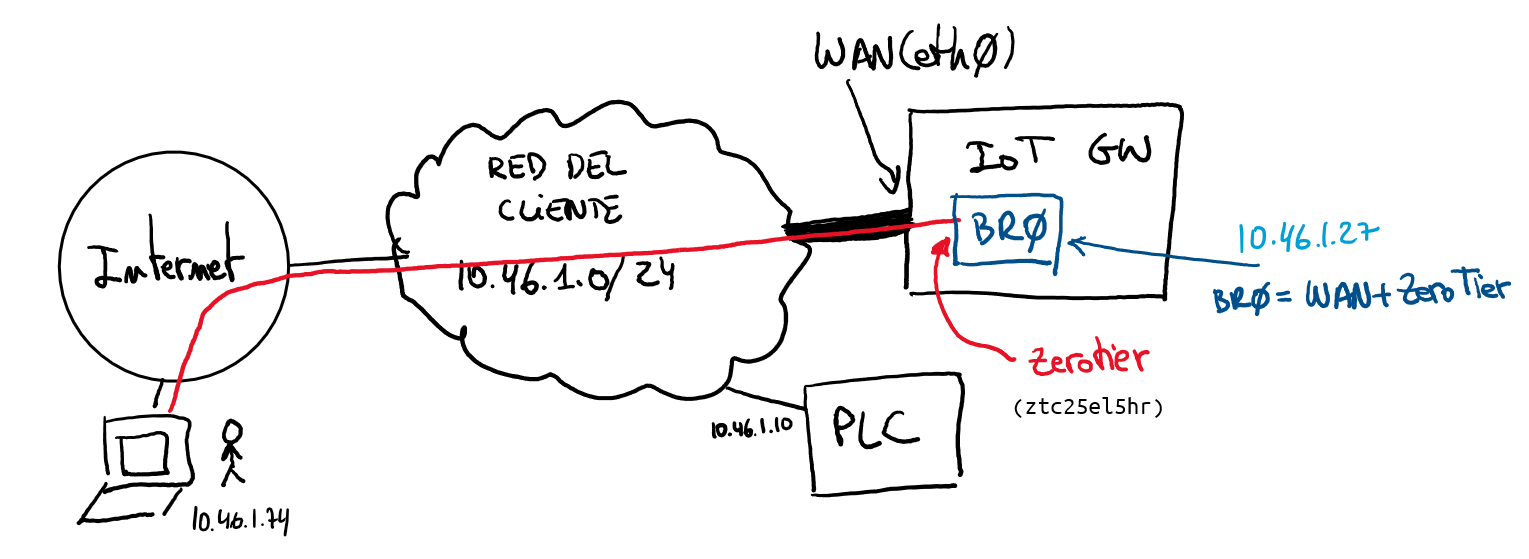
Suponemos una empresa que tiene conectadas las máquinas en la misma red que tienen acceso a Internet. En ese caso colocaremos nuestro IoT GW como un dispositivo más de la red del cliente. Una vez nuestro dispositivo tenga la IP conectada tendrá visibilidad con el/los PLC que estarán en la misma red.
Configuración IP del IoT GW:
WAN: eth0
	IP: unmanaged (sin configuración IP)
MANTENIMENT: ztc25el5hr
	IP: unmanaged (sin configuración IP)
BRIDGE(BR0): br-br0 (MANTENIMENT + WAN)
	IP: 10.46.1.27
Tabla de Contenidos
/etc/netplan/50-cloud-init.yaml
# This file is generated from information provided by
# the datasource.  Changes to it will not persist across an instance.
# To disable cloud-init's network configuration capabilities, write a file
# /etc/cloud/cloud.cfg.d/99-disable-network-config.cfg with the following:
# network: {config: disabled}
network:
  version: 2
  ethernets:
    eth0:
      addresses: []
      dhcp4: false
      optional: true
  bridges:
    br0:
      addresses: [ 10.46.1.27/24 ]
      dhcp4: false
      interfaces:
        - eth0
      gateway4: 10.46.1.1
      nameservers:
addresses: [10.2.8.27]/opt/network/bridge.sh
#!/bin/bash
PATH="/bin:/sbin:/usr/bin:/usr/sbin"
export PATH

LOCAL_IF="eth0"
VPN_IF="ztc25el5hr"
BR_IP="10.46.1.27/24"
BR_NET="10.46.1.0/24"

date

# esperem fins que la interficie existeixi
while [ ! -e "/sys/class/net/$VPN_IF" ];
do
  sleep 2;
done

# bridge
#brctl addbr br0
#brctl addif br0 $LOCAL_IF
brctl addif br0 $VPN_IF
brctl setfd br0 0
#brctl setmaxage br0 0

# ip
#ifconfig $LOCAL_IF 0.0.0.0
#ifconfig $VPN_IF 0.0.0.0
#ifconfig br0 $BR_IP
#ifconfig $LOCAL_IF up
#ifconfig $VPN_IF up
#ifconfig br0 up

# route
#ip route add $BR_NET dev br0

# iptables
iptables -I FORWARD -i $VPN_IF -j ACCEPT
iptables -I FORWARD -o $VPN_IF -j ACCEPT
iptables -I FORWARD -i br0 -j ACCEPT
iptables -I FORWARD -o br0 -j ACCEPT
iptables -I FORWARD -i $LOCAL_IF -j ACCEPT
iptables -I FORWARD -o $LOCAL_IF -j ACCEPTcrontab -l
@reboot /opt/network/bridge.sh > /var/log/bridge.log 2>&1/var/lib/zerotier-one/network.d/NETWORKID.local.conf
allowManaged=0
allowGlobal=0
allowDefault=0
allowDNS=0
Secciones: